Product Pricing Solutions Resources About Us Free Trial

API Documentation

Everything you need to integrate Digicrypsis programmatically.

Quick Start — 4 Steps

1

Get API Key

Generate an API key from your Digicrypsis dashboard settings.

2

Connect Repo

Link your GitHub, GitLab, or Bitbucket repository.

3

Run First Scan

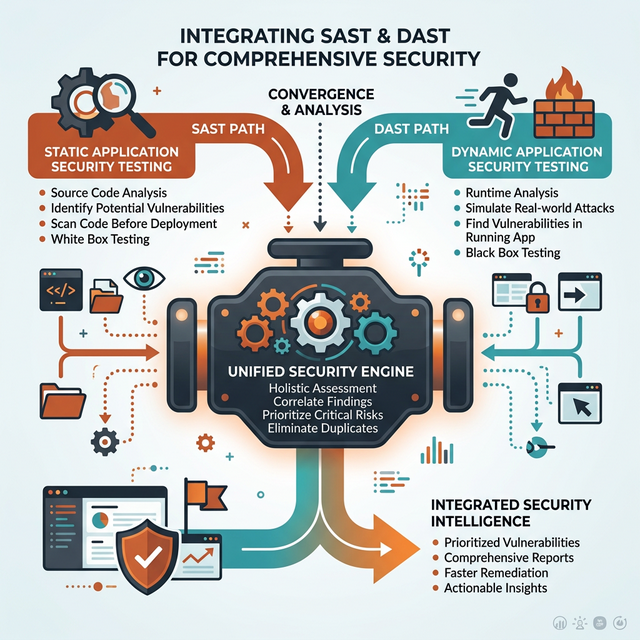
Trigger a SAST+DAST scan via API or CLI.

4

Get Results

Receive prioritized findings via API response or webhook.
Feature illustration

API Reference

Authentication

curl -H "Authorization: Bearer YOUR_API_KEY" \
  https://api.digicrypsis.com/v1/scans

Start a Scan

POST /v1/scans
{
  "repo": "github.com/org/app",
  "type": ["sast", "dast"],
  "branch": "main"
}
📡

REST API

Full RESTful API with comprehensive endpoints for scans, findings, remediation, and reporting.

View REST Docs →
🔔

Webhooks

Real-time notifications for scan completions, new findings, and remediation status changes.

Webhook Guide →
💻

CLI Tool

Command-line interface for local scanning, CI/CD integration, and scripted workflows.

CLI Reference →
🔌

IDE Extensions

VS Code and IntelliJ extensions for real-time vulnerability detection while coding.

Extension Docs →

Start Building

Get your API key and run your first scan in under 5 minutes.